Turning a Pet Photo into a Cross Stitch Portrait
August 11, 2026 · Updated November 2, 2026
Pet portraits are the most-stitched photo patterns for a reason. They are so lovable and adorable and just the best thing in the world. A finished canvas of your own dog or cat (or any exotic pet) beats anything from a pattern book. I had one hanging in our hallway, and literally everyone kept asking me "did you really do this?". They're also where photo conversion goes wrong most often, because fur, whiskers, and dark eyes are exactly the things a careless conversion destroys. Here's how to get a pattern that looks exactly like your black lab, French bulldog, or border collie. The examples use the Photo2Stitch picture to cross stitch pattern maker, but the photo advice applies to any converter.
The photo matters more than the pattern settings
Every pet photographs the same two ways: the quick snap from above (huge but cute forehead, tiny body, floor everywhere) and the good one (like a George washington portrait). For stitching you need the good one:
- Eye level, face filling most of the frame. The portrait convention exists because it works, at 120 stitches wide there's no room for a body and a recognizable face. Get that presidential shot.
- Daylight, not flash. Flash flattens fur texture into one shade and turns eyes into glowing discs. A window-lit photo keeps the color variation the converter needs.
- Both eyes visible and sharp. Recognition lives in the eyes. You want those gorgeous eyes that always look at you with love, to look just as crisp in the picture.
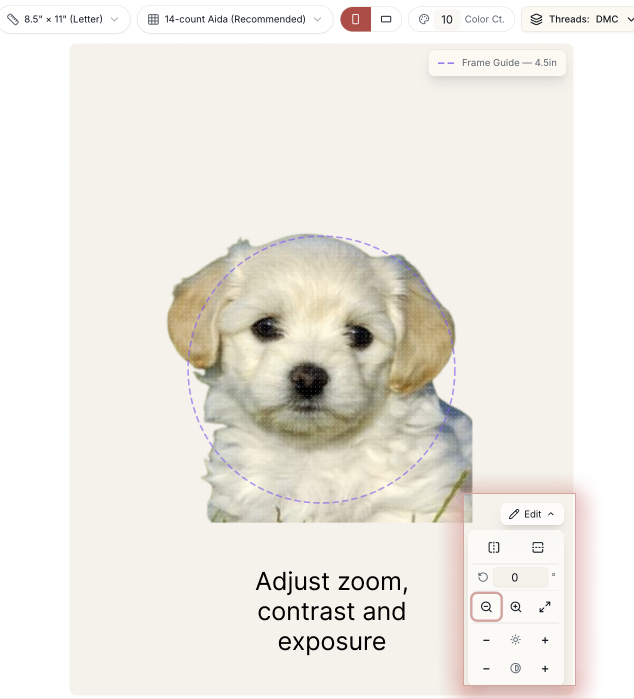
Dark-furred pets (black labs, black cats) need one extra step: brighten the photo until you can see fur direction on screen. Otherwise the whole animal converts to a single near-black mass. This is actually find for a flat cartoon style stitch. For depth you want a directional light, or somethign to highlight them hips and curves. You can also play around with the editor's brightness and contrast sliders to find the right contract balance.
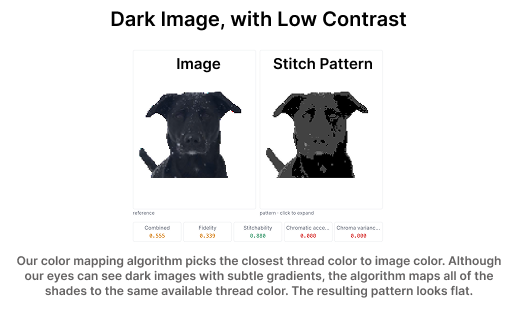
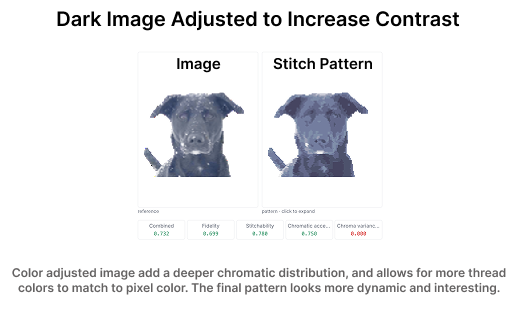
Background: remove it, or embrace one color
The fastest way to a clean pet portrait is a transparent-background PNG, most phone photo apps can cut a subject out now, and the editor treats transparency as unstitchched canvas. Every thread color then goes to the animal. I would highly recommend that, although some pros like adding things like flowers and laurel.
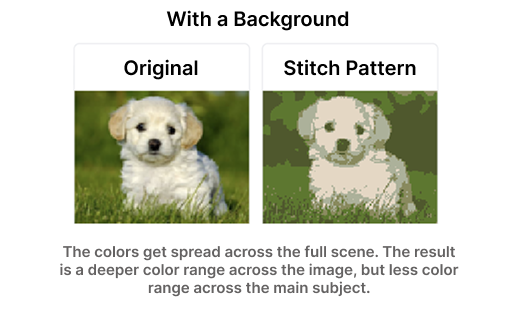
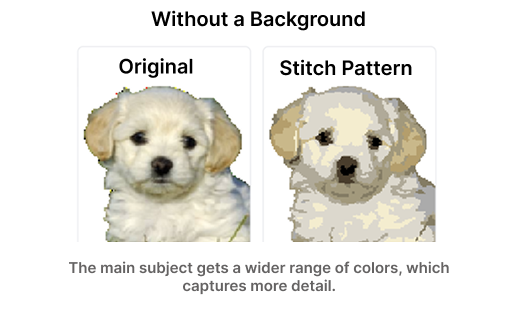
If you keep a background, keep it boring: crop until it's one rough color region, and let the conversion merge it into a handful of shades. A solid background also frames dark pets nicely, a black cat on a pale background pops in a way no amount of fur detail can achieve. I often use Figma for these edits, but it doesn't have to be that intense.
Color count for fur
Fur is gradients, and gradients eat colors. Practical starting points:
- Single-color pets (all black, all white, orange tabby): 15–20 colors. Most of the budget goes to shading one hue plus the eyes and nose.
- Two-tone and patterned pets (tuxedo cats, spaniels, calicos): 20–30. Patterns need their boundary shades or the patches look pasted on.
- Multi-color or fine-brindled coats: 30–40, and consider a larger canvas so the pattern has room to use them.
Generate a preview at your first guess, then look at the eyes and nose. If they read correctly, the count is right, fur forgives a lot, faces don't. Preview is free, so trying 20 and 28 and comparing costs nothing but a minute.
The digital canvas fixes what conversion can't know
No converter knows that one stray light patch on the ear is a reflection, not a marking. After unlocking the pattern, the digital canvas lets you repair those judgment calls by hand: repaint a patch of stitches, swap one thread color everywhere, or clean the edge where fur meets background. Five minutes of editing does more for likeness than any amount of re-generating.
Two edits worth making on almost every pet pattern:
- Simplify the eye highlights to a single white or pale-blue stitch per eye. Scattered highlight stitches read as noise; one crisp dot reads as a catchlight.
- Unify the whisker area. Whiskers rarely survive conversion, either remove the broken fragments, or backstitch them over the finished piece instead (a single line of thread over the top, added after stitching).
Sizing a cross stitch pet portrait for a gift
A pet portrait around 100×100 stitches on 14-count Aida finishes at just over 7 inches square, a standard 8×10 frame with a mat, and roughly 10,000 stitches. That's an achievable couple-of-months project and the single most reliable tear-jerker gift in the craft.
Upload your pet's photo and preview the pattern free, you'll know within a minute whether the photo is the right one.
Try it with your own photo
Upload a photo and see your counted cross stitch pattern preview — free, before you pay anything.
Try the free pattern preview