How to Turn Your Fall Photos into a Cross Stitch or Needlepoint Pattern
September 19, 2026
The autumn photos sitting on your phone right now (the pumpkin you grew, your dog standing in leaves, the tree at the end of the road that turns brilliant orange every October) convert into counted cross stitch and needlepoint just as readily as any pre-designed motif. And because they're yours, the finished piece carries something a catalogue pattern never will.
That said, autumn photos have specific quirks that trip up conversions. Flat grey light is everywhere in October. Backgrounds full of colorful foliage eat your entire color budget. Subjects photographed at dusk collapse into muddy darks. This guide walks through each of those problems and how to fix them before you upload.
Which Autumn Photos Convert Well, and Which Don't
Photo selection matters more than any software setting. The working rule of thumb: if you can make out the main subject while squinting at your screen, it will survive conversion. If the subject disappears into the background when you half-close your eyes, no amount of color-count tweaking will save it.
Fall photos that convert especially well:
A single pumpkin photographed close-up is one of the most reliable autumn conversion subjects. The shape is bold and graphic, the color gradient from pale stem to deep orange belly is exactly what a converter handles best, and there's usually enough contrast between the pumpkin and whatever it's sitting on to produce clean edges.
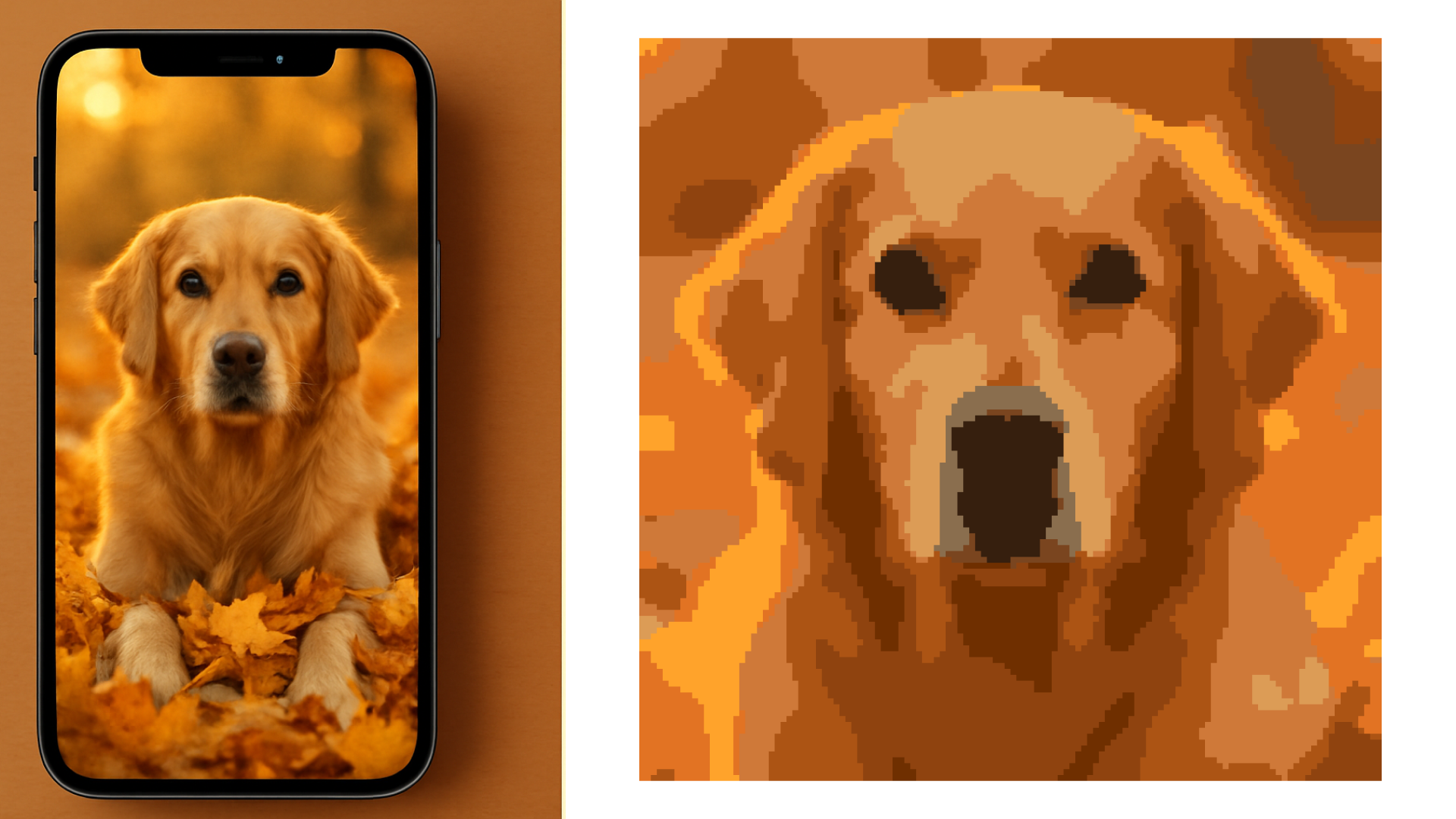
A pet portrait in autumn light (face filling most of the frame, shot at eye level) works for the same reasons it works in any season. What fall adds is a warm, seasonal palette: fallen leaves as a blurred backdrop, golden late-afternoon light on the fur. Keep the leaves out of focus behind a sharp face and the conversion tends to go well.
A single tree at peak color against an open sky is a deceptively good conversion subject. The canopy provides rich color variation, the sky gives clean negative space, and the silhouette reads instantly even at small stitch sizes.
Tight still lifes (a cluster of gourds, a bowl of apples, a vase of dried sunflowers) work because the boundaries between objects are clear, the colors are warm and well-separated, and the composition is already controlled.
What struggles:
A dog running through a pile of autumn leaves, where the leaves are as vivid and detailed as the dog, is genuinely difficult. The converter can't know the dog is the subject; every color in those leaves competes for palette space. The result is usually confetti: dozens of isolated single stitches of near-identical orange and gold, spread across both subject and background, with neither reading clearly.
A wide landscape where the main subject is small relative to the frame (a person standing in an autumn field) produces a smudge at portrait canvas sizes. If the subject is shorter than a quarter of the frame height, crop before converting.
The Flat-Light Problem: Autumn's Biggest Conversion Enemy
October and November in much of the northern hemisphere mean overcast skies, diffused light, and low contrast. This produces beautiful atmospheric photos that are terrible source images for a pattern converter. Flat light compresses your entire scene into a narrow mid-tone range, and when a converter maps that to twenty DMC shades, the result is muddy color regions with poor edge definition.
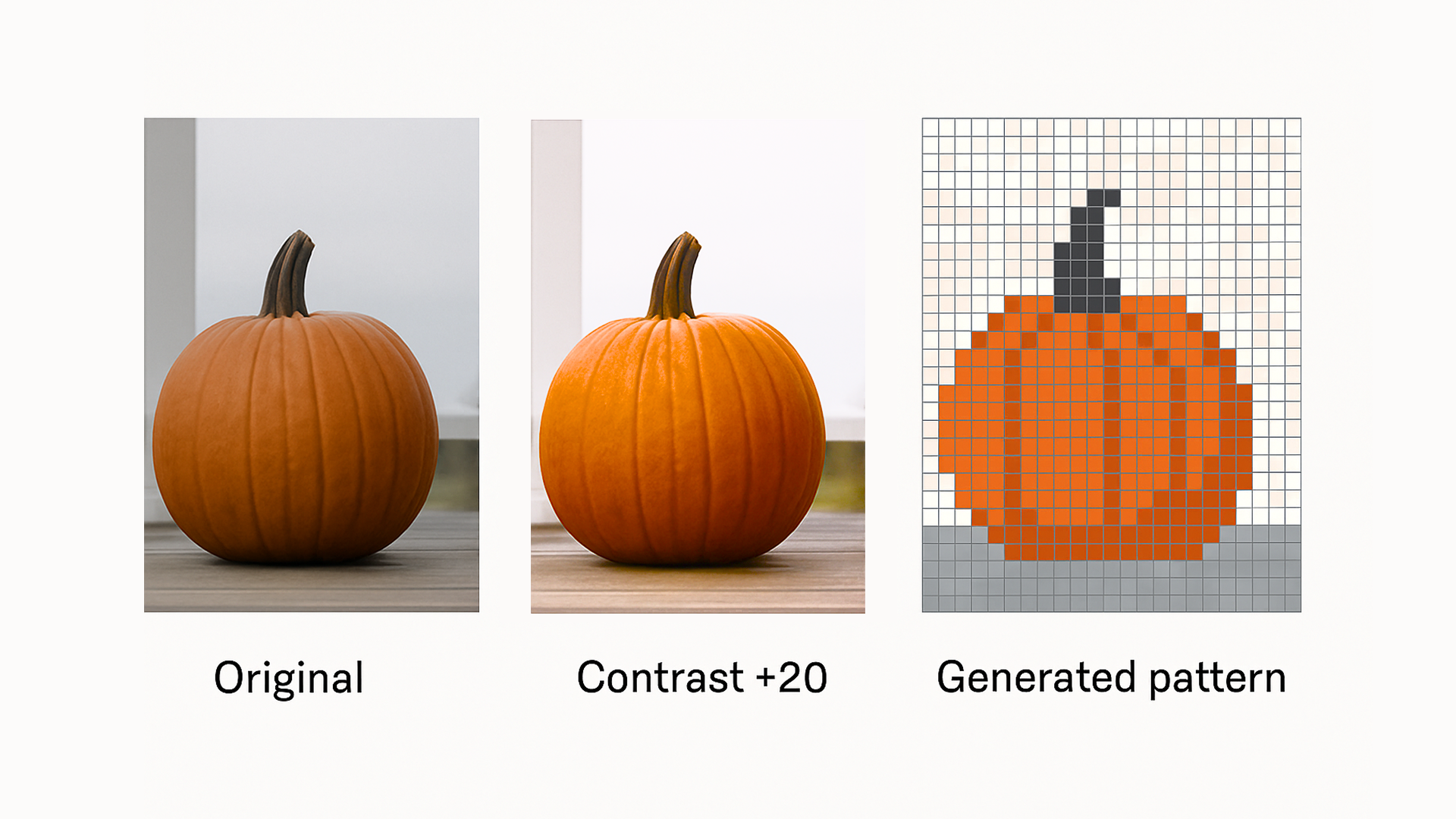
Raise the contrast by 15–25 points before uploading. On a smartphone, the built-in Photos app has a contrast slider. In Lightroom Mobile or Snapseed, use Clarity or the contrast control. You're not trying to make the photo look better as a photo; you're making it more readable for the algorithm. An autumn photo that looks slightly over-processed will almost always produce a cleaner, sharper pattern than one that looks natural.
A quick sanity test before converting: squint at the photo. Can you still clearly see the subject, its edges, and the main color areas? Good. Does it all blur into one tonal soup? Add more contrast.
For golden hour shots, the late-afternoon autumn light is genuinely excellent for source photos: warm, directional, and high-contrast. If you have a choice between a sunny October afternoon shot and an overcast morning shot of the same subject, use the sunny one. The raking light picks out texture in leaves and fur that flat light hides.
Background: Remove It, Frame It, or Use It
The background decision is the highest-leverage choice you make before converting an autumn photo. Three options:
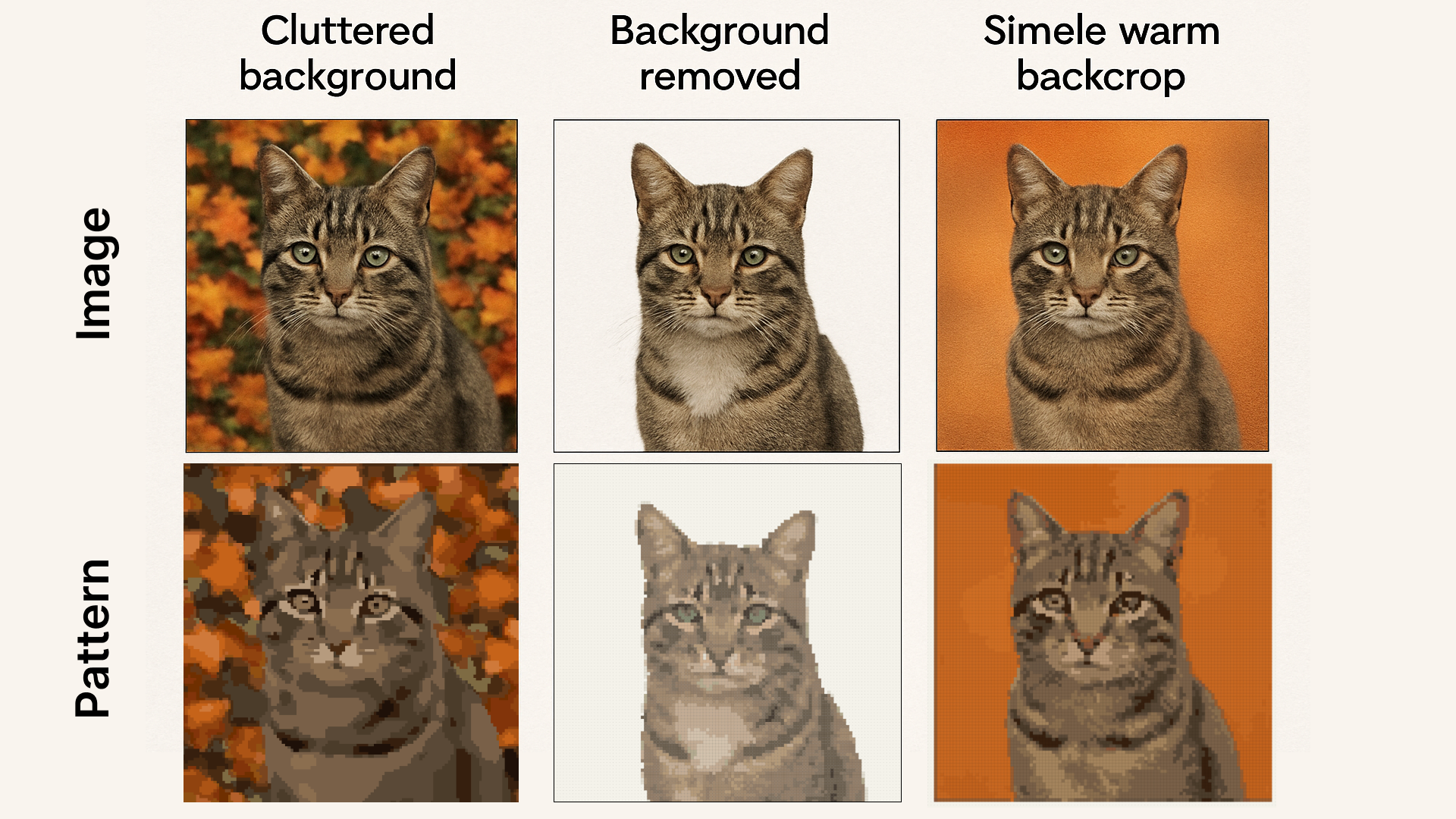
Remove it entirely. A transparent-background PNG puts every color in your pattern budget toward the subject itself. Most modern phone apps (iOS Photos, Google Photos, Samsung Gallery) can remove backgrounds with one tap. Free web tools like remove.bg also do this well. The result is a subject that stands out cleanly against whatever Aida or canvas color you stitch on. For pet portraits and single-subject still lifes, this is almost always the right call.
Keep a clean, simple background. If you want context — autumn leaves, a wooden fence, a colored wall — the key is making sure the background is boring enough to merge into a handful of colors during conversion. A background of uniform blurred orange-gold foliage (portrait mode on a smartphone achieves this naturally) costs you three or four palette slots and adds seasonal flavor. A background of individually distinct, sharply-focused leaves costs you fifteen slots and fights with your subject for attention.
Use the background as a design element. A pumpkin photographed against a deep blue autumn sky or a dark barn wall produces a high-contrast silhouette effect that converts into something bold and graphic. A cat on a vibrant red-orange leaf carpet, if the leaves are blurred enough to read as a solid wash of color, can create a rich seasonal backdrop. The rule: the background should read as one or two color regions, not as a hundred individual objects.
Color Count for Autumn Subjects
Autumn photos generate more color variety than almost any other season, since fall foliage alone contains hundreds of distinct warm hues. That richness is an asset, but it needs deliberate color count choices.
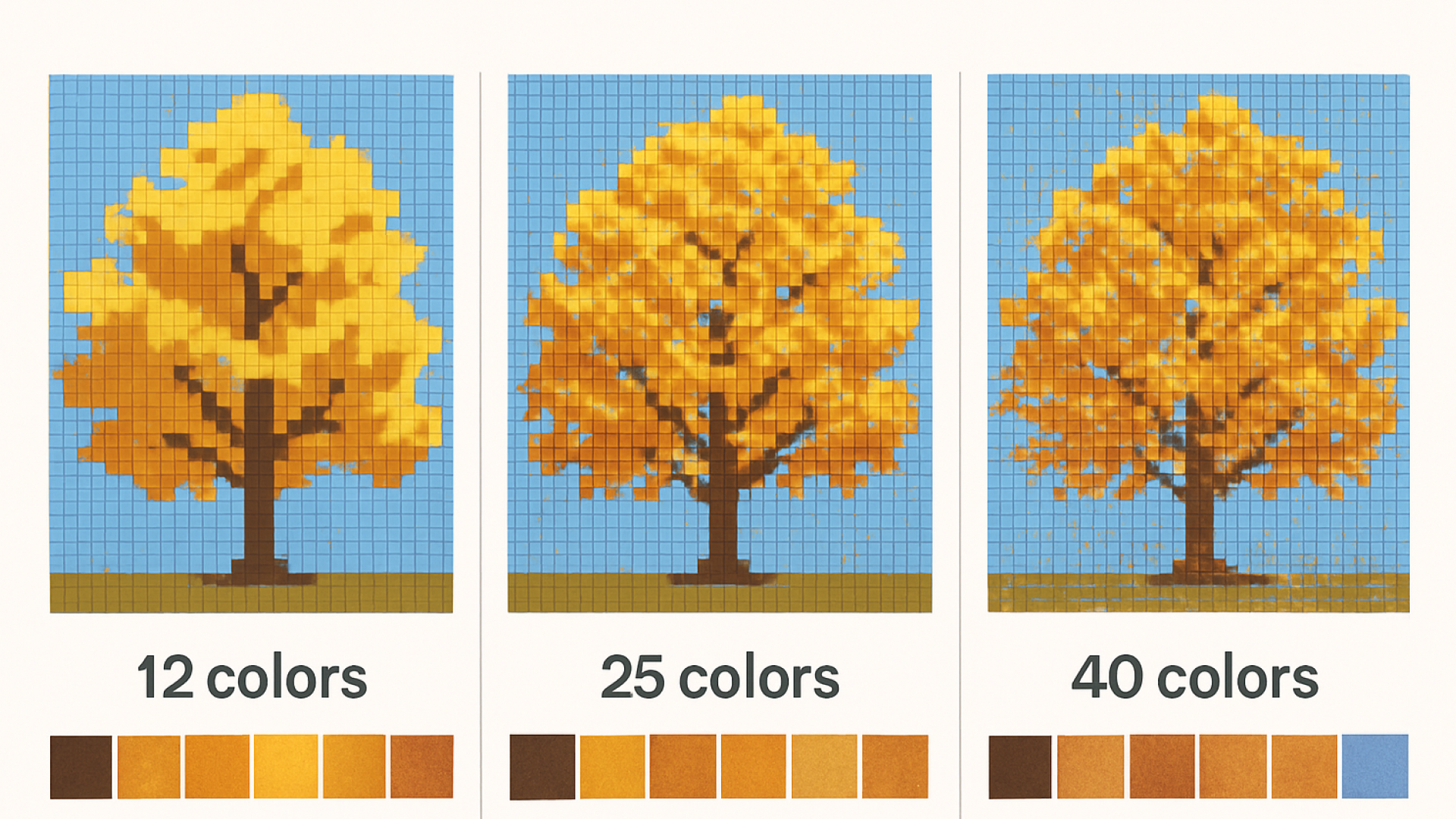
Simple, graphic motifs (a single pumpkin, an acorn, a flat graphic silhouette of a tree): 12–20 colors. These subjects have clear color regions that quantize cleanly. More colors than this produces near-duplicate DMC shades that are invisible at stitching distance and annoying to keep organized.
Pet portraits in autumn light (dog or cat, face close-up, autumn background blurred or removed): 20–30 colors. Enough to model fur tone and ear detail without spraying identical shades across the whole canvas. If the background is a soft blurred leaf texture, add two to five colors beyond what you'd use for the subject alone.
Detailed autumn landscapes (a tree with many individual leaves showing, a harvest scene, multiple distinct subjects): 28–40 colors. Autumn foliage genuinely rewards a higher color count on a medium canvas (130+ stitches wide) because the tonal variation in real leaves is exactly what those extra shades capture. On a small canvas at the same count, it produces confetti. Canvas size matters here.
The practical test: generate a preview at your initial color count, then zoom into the focal point. If the eyes on a pet portrait read as a clear dark shape with a catchlight, the count is right. If the focal point looks like a dithered spray of seven similar shades, reduce the count by five and regenerate.
After the Pattern: The Digital Canvas for Fall-Specific Fixes
Autumn photos generate a predictable set of conversion artifacts worth knowing about before you start editing.
Near-duplicate leaf colors. Foliage converted with a high color count will often produce clusters of two or three DMC shades — say, 721, 720, and 722 — that are nearly indistinguishable in the hoop. After unlocking the pattern, the digital canvas lets you merge these neighbors into a single shade, cutting your thread palette and eliminating pointless color changes mid-stitch. Five minutes of color consolidation on an autumn landscape pattern typically saves thirty minutes of confused thread-parking while stitching.
Background confetti. Even a blurred background can produce isolated single-stitch outliers in unusual shades. In the digital canvas these are easy to repaint: select the offending stitch, swap it to the nearest background color, done. What would have been a frustrating interruption mid-stitch is a quick edit before you even pick up a needle.
Edge noise at the subject boundary. The border where a pumpkin or animal subject meets its background often produces a fringe of mixed stitches (pixels where the converter was uncertain which color zone each one belongs to). Cleaning that fringe gives the subject a crisper outline and makes the piece read better from a distance, which is where autumn pieces usually live: on a mantel or a wall.

Fall photos are worth converting. The subjects are vivid, the palette is generous, and there's something genuinely satisfying about stitching a scene you lived through: the particular shade of a tree you see every year, the pumpkin from the garden, the look on your dog's face in the leaves. The prep work described above takes five to ten minutes and makes the difference between a pattern that reads cleanly and one that doesn't.
Start with a free autumn photo preview — upload, adjust, and generate before you pay anything.
Try it with your own photo
Upload a photo and see your counted cross stitch pattern preview — free, before you pay anything.
Try the free pattern previewA little autumn gift for reading this far
Start your fall pattern free, then use one of these codes at checkout when you unlock the digital canvas.
Codes valid through the end of autumn 2026.