Photo2Stitch vs Pic2Pat, Which Photo to Cross Stitch Converter?
August 12, 2026 · Updated October 19, 2026
If you've searched for a way to turn a photo into a cross stitch pattern, you've almost certainly run into Pic2Pat, it's one of the longest-standing free converters on the web, and for good reason. We built Photo2Stitch with a different philosophy, and the honest answer to "which should I use?" is: it depends on what happens after the pattern is generated. Here's a fair comparison. (Written August 2026, features on both sides change, so verify anything that matters to you.)
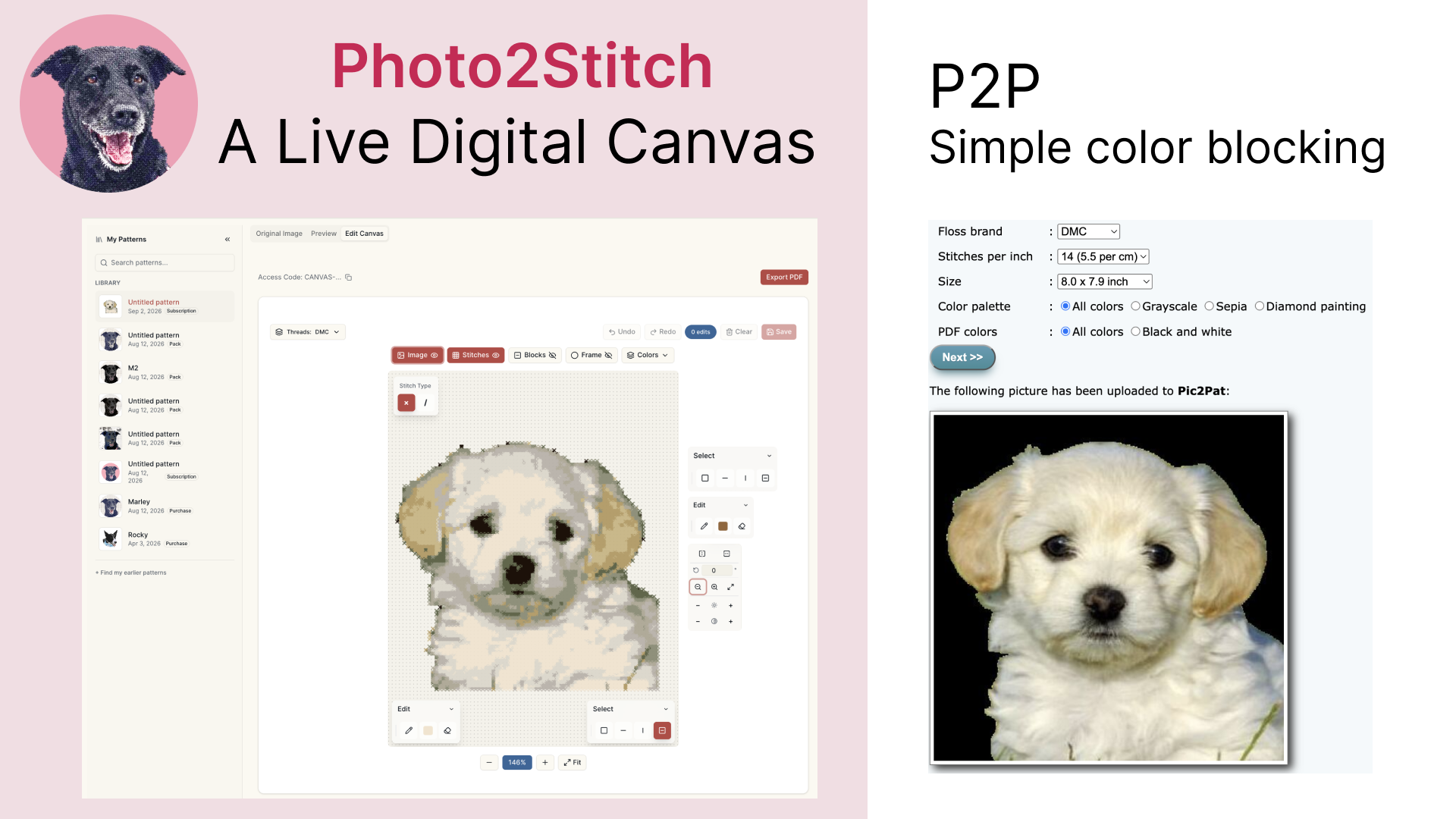
Where Pic2Pat is genuinely great
Credit where it's due. Pic2Pat is free, fast, and requires no account, you upload a photo, pick from its size and color options, and get a complete multi-page PDF chart with a color key. For a one-off pattern where the conversion comes out right on the first try, that's hard to argue with, and plenty of beautiful pieces have been stitched from its charts over the years. My own challenges using Pic2Pat is that it feels a bit like we are in 1999, if you know what I mean. The user experience can be challenging, and getting the hang of where everything is takes some time. There is a lot of great information, but it's always like an easter egg hunt.
If your budget is zero and your photo is simple and high-contrast, try it. We'd rather you stitch something than bounce between tools.
Where the philosophies differ
Photo2Stitch has several core design principles: modern and easy user experience, stitch pattern is a live document that users should be able to refine, friendly to any skill level.
A photo-to-pattern conversion is never perfect on the first pass. Skin tones band into odd stripes, a busy background eats half the color budget, and isolated single stitches of near-identical colors, confetti, creep in everywhere. The question that separates converters is: what can you do about it?
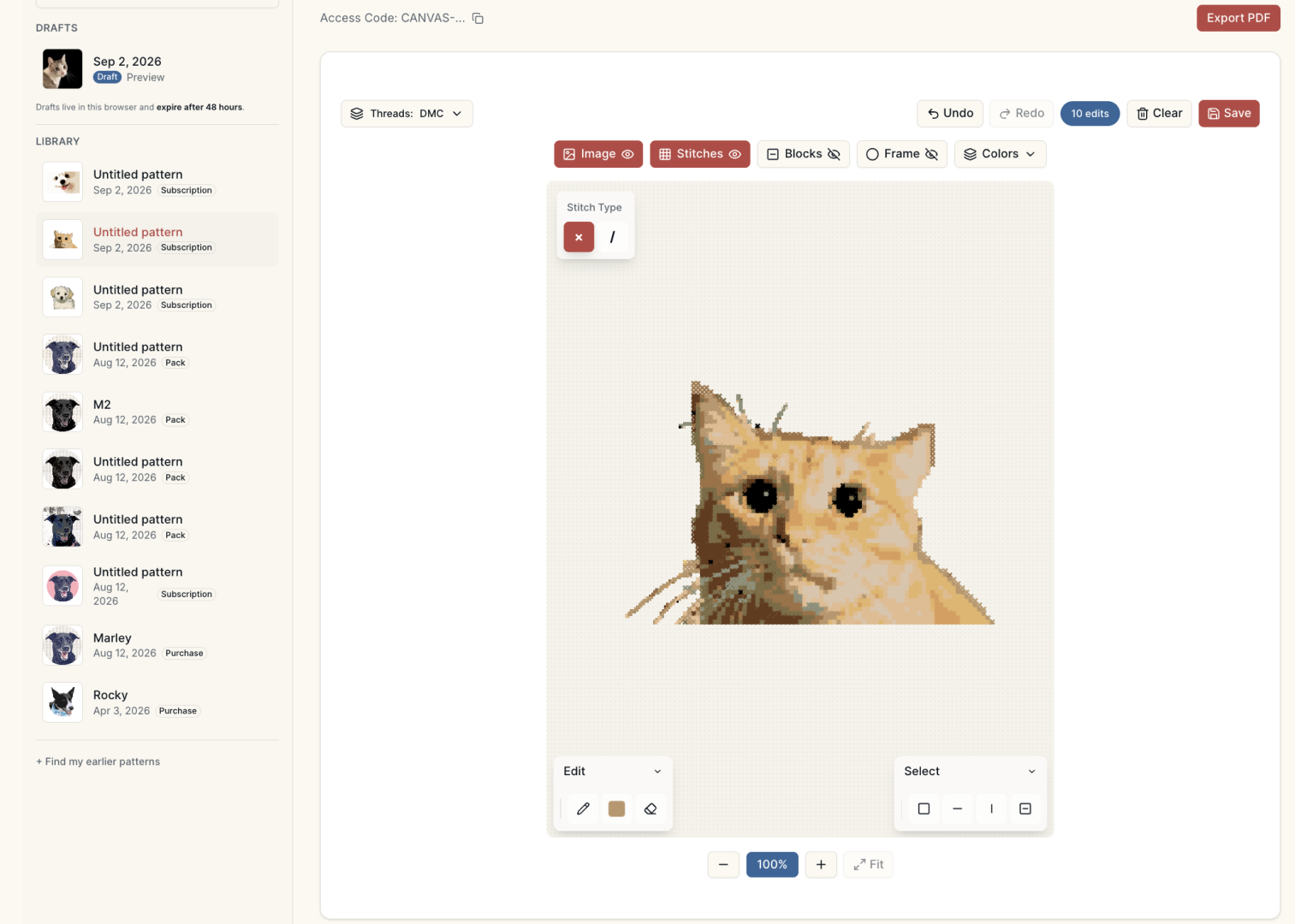
With a generate-only tool, the answer is: change the settings and re-generate, then take whatever comes out. The output is a fixed document.
Photo2Stitch treats the generated pattern as a starting point:
- Free preview first. Photo2Stitch is a free picture to cross stitch pattern converter. It's also a free image to needlepoint converter. You can edit and adjust your image to imrpove the pattern, re-generate with different crops, contrast, and color counts until you like what you see. We call this phase a preview because you get to see the pattern before paying to access it on digital canvas, where you can edit the actual stitches and colors in a more detailed way.
- Confetti reduction built into the conversion, merging stray single stitches into their neighbors, the tedious cleanup a hand-charted pattern would need. The algorithms can only take you so far.
- An editable digital canvas. After unlocking, you can repaint individual stitches, swap one thread color everywhere it appears, and clean edges, the judgment calls no algorithm gets right, like knowing that a light patch on a pet's ear is a reflection rather than a marking. The goal is to put in a bit of work cleanup the pattern, and less work cutting threads and restitching to match your preference.
- We Maintain Your Pattern Library. Signup, create a profile and we will maintain a historical library of your patterns. Come back and edit them anythime.
- Matched DMC thread codes with a bill of materials, estimating how much of each thread the piece actually needs before you shop. We share the bills of materials so you don't have to spend hours researching. Especially useful for newcomers to the craft.
- Share with Friends, We have a print a PDF feature that you can also use to print the stitch plan and get the bills of materials in case you want gift the packet, or share it with a friend.
The cost question, plainly
Pic2Pat's chart is free. Photo2Stitch's preview is free, and you get one free digital canvas pattern. We also offer regular and seasonal discouts; The pricing is simple, once you are happy with the pattern, get access to the digital canvas for a one-time $5 per pattern, or subscribe for $15/month for 20 patterns if you convert regularly and want to keep up with your pattern library. Whether that's worth it comes down to few question, if the answer is yes to any of these, we recommend you try Photo2Stitch. We built it precisely because our experience with other tools just didn't get us there:
- Will you want to change anything after seeing the conversion?
- Do you want to keep up with your pattern library and edit anytime?
- Do you value an easy and modern user experience?
- Are you new to the craft?
- Do you plan to share your pattern or make a gift?
For very skilled stitchers out there, how many hours did you spend updating your stitch pattern? Get to the craft of stitching faster with the digital canvas edits. Update as much as you want, any color, until you are happy.
A fair summary
| You want… | Better fit |
|---|---|
| A free chart, willing to spend some time on learning the UI | Pic2Pat |
| A quick test of whether your photo converts well | Either, our preview is free too |
| To fix colors, edges, and stray stitches before stitching | Photo2Stitch |
| DMC-matched shopping list and thread estimates | Photo2Stitch |
| A pattern for a 60-hour heirloom project | Photo2Stitch, editing pays for itself |
| To edit a pattern you already have, from an OXS file | Photo2Stitch |
| Backstitch outlines and lettering for names and dates | Photo2Stitch |
| To move your pattern to another app as an OXS file | Photo2Stitch |
The last three are newer. As of October 2026, Pic2Pat's site describes making a chart from a photo and downloading it as a PDF, and doesn't list pattern import, backstitch or OXS export. You can bring in an OXS file you already have and keep its backstitch and part stitches.
If you landed here searching for Pic2Stitch, Photos2Stitch, or Pic to Pat, you are probably looking for one of these two tools. Pic2Pat is the free PDF generator. Photo2Stitch (or Picture2Stitch) is the converter with the editable digital canvas. Both turn photos into cross stitch patterns, the difference is in the conversion quality and what you can do after the conversion.
The best way to compare is to run the same photo through both: generate a free preview here, do the same on Pic2Pat, and put the results side by side. Our photo-choosing guide helps either way, a well-chosen photo converts better in every tool.
Try it with your own photo
Upload a photo and see your counted cross stitch pattern preview — free, before you pay anything.
Try the free pattern preview