Backstitch Lettering: Add Names and Dates to a Cross Stitch
October 19, 2026
Most stitched gifts end up needing words: a name under a portrait, a wedding date, the year a baby arrived. Photo2Stitch gives you two ways to add them. The Text tool letters in full stitches, and backstitch lettering draws each letter as thin lines. This guide is mostly about backstitch lettering, because a name takes far less room that way and looks like the captions on a commercial chart, but a full-stitch name works just as well when you want bold letters, and the next section helps you choose.
Full-stitch text vs backstitch lettering
Photo2Stitch has both, and they suit different jobs. As a rule of thumb, I'd use full-stitch text when the words are part of the design and backstitch lettering when they're a caption.
The Text tool writes letters in full stitches, as covered in the guide to personalizing a pattern. Full-stitch letters are bold and graphic. They suit samplers, a big statement word, or anything meant to be read across a room, but they need roughly 7 to 9 stitches of height to stay legible. You get upper and lower case and four fonts (Sans, Serif, Mono and Script), at any height from 5 to 60 stitches, and the letters become ordinary stitches in your thread list.
Backstitch lettering writes each letter as backstitch lines on the Details layer, drawn over your pattern. It's the style most charts use for a name and date under a picture: thin, quick to stitch, and readable at small sizes. Because the lines sit on top of the stitches instead of replacing them, you can letter across a background area without cutting a hole in it.
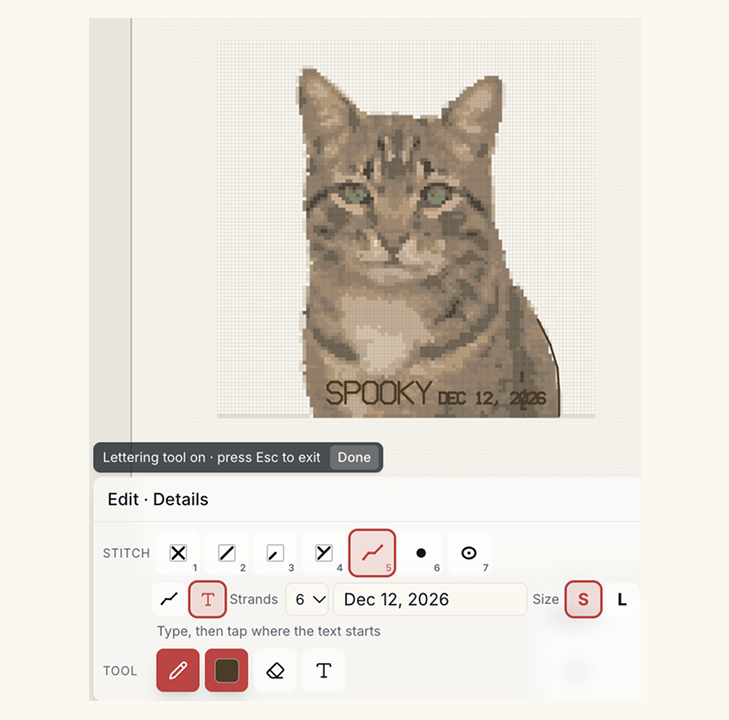
The two Halloween demos below show one of each. Charly's name, "VLAD CHARLY JR", is backstitch lettering under the portrait. "Spooky" is full-stitch text in the Script font, laid right across the cat.
How to add backstitch lettering
Lettering is added on the Digital Canvas once a pattern is unlocked. If you don't have a pattern yet, preview your photo free in the editor first.
- Pick Backstitch in the Stitch row (key 5).
- Click the T icon next to the line tool to switch to lettering.
- Type your text, up to 40 characters.
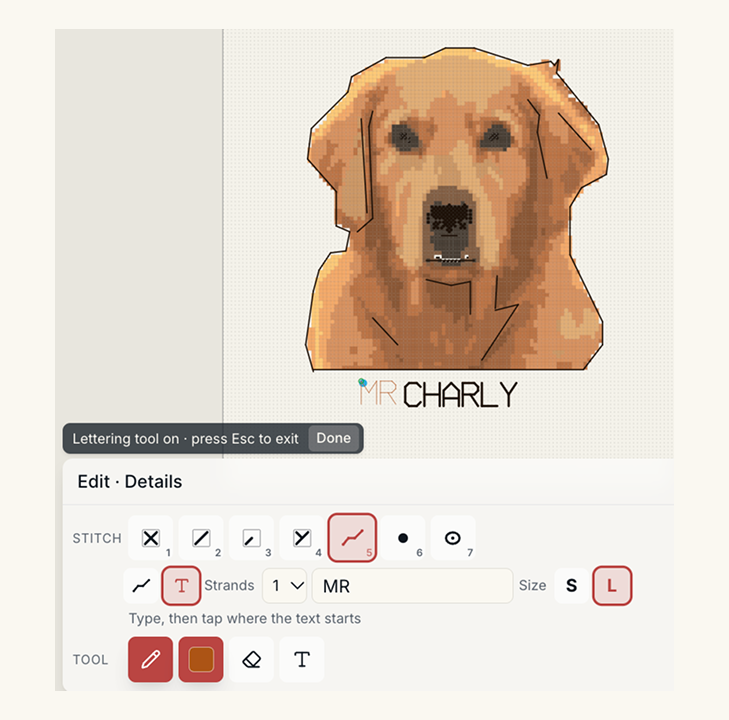
- Choose a size, S or L, and set the strands and the thread color.
- Move over the canvas. A live preview of the text follows your pointer; tap where the text should start.
The whole line goes in as one step, so a single undo takes it back out if the spacing looks wrong. To change part of it later, box-select those letters and use the details in the selection to delete or recolor them.
Letters are drawn as capitals, so "Emma" and "EMMA" come out the same. Numbers are included, along with the punctuation you're likely to need: period, comma, hyphen, apostrophe, !, ?, &, /, : and +. Any other character becomes a space.
Adding a name in full stitches instead
If you'd rather have a bold, filled name, use the Text tool in the Tool row instead:
- Pick the thread color for the letters.
- Click Text and type up to 60 characters.
- Choose a font and a height in stitches. Around 7 to 9 suits a name you want read easily.
- Tap where the text should go, then press Place text (or Enter).
Full-stitch text covers the stitches underneath it, so give it a plain strip of background or a border band. You can use both styles in one design, for example a full-stitch name with a backstitch date under it.
Choosing size, strands and color
The two sizes are fixed. S letters are 2 stitches wide and 3 tall, and L letters are 4 wide and 6 tall. With the space between letters, each character takes about 2.5 stitches of width at S and 5 at L, so a 10-letter name runs about 25 stitches at S and about 50 at L.
On 14-count Aida that makes S letters about a fifth of an inch tall and L letters a little under half an inch. I'd use S for a date or a small signature in a corner, and L for a name you want people to actually read.
For strands, one or two suits most lettering. One keeps small S letters crisp; two gives L letters more weight. The menu goes up to 6 if you want something heavier. Pick a dark thread that contrasts with whatever sits underneath, because a thin line in a mid-tone disappears quickly.
Since the letters are backstitch, their thread lands in the bill of materials automatically: the length of every stroke times your strands, plus a margin for waste.
Ideas for names and dates
- A pet's name under a portrait from a photo. If the portrait doesn't exist yet, the pet portrait guide covers picking the photo.
- Two names and a wedding date under a wedding photo pattern, with the date in S on its own line.
- A birth announcement with the name in L and the date and weight in S underneath.
- A short phrase across the top of a house portrait: BLESS THIS HOUSE, or HOME SWEET HOME.
- Initials and a year in a corner, as a maker's mark.
The same Backstitch tool draws outlines and details too; the guide to backstitch, knots and beads covers the rest of it. Upload a photo to start your pattern and add the lettering once it's unlocked.
Try it with your own photo
Upload a photo and see your counted cross stitch pattern preview — free, before you pay anything.
Try the free pattern preview