Cross Stitch a Photo: How a Picture Becomes a Counted Chart
September 1, 2026 · Updated October 26, 2026
Cross stitch charts a photo as a grid of X stitches on Aida (or evenweave). Each square is one (or a block of) full crosses in a floss colour. Unlike needlepoint or tapestry, the fabric is part of the look: unstitched Aida can remain as background, and the characteristic X-grid is visible up close.
This article is the cross-stitch-focused counterpart to those canvas guides: Aida counts, stranded cotton, and how Photo2Stitch’s three conversion steps apply when the stitch is a cross rather than tent stitch. The same process works whether you are converting an image to cross stitch, turning a picture into a cross stitch pattern, or making a cross stitch pattern from a photograph.
What a photo-to-cross-stitch conversion actually does
A converter does not “paint” with thread. It quantizes the image (limits it to N colours), matches those colours to a floss range such as DMC, and assigns each grid cell a symbol or colour. You then stitch those cells as counted crosses.
That is why photo choice and colour count matter more than any slogan about the software. A face that fills the frame at 14-count will look like a person; the same face as a distant figure will look like a beige smudge. A longer walkthrough of photo choice and sizing is in How to turn a photo into a cross stitch pattern and choosing an Aida count.
Cross-stitch specifics versus canvaswork:
- Fabric. 11, 14, 16, or 18-count Aida (14 is the usual default for photos).
- Stitch. Full cross; half stitch and backstitch are optional extras, not what the photo grid assumes by default.
- Floss. Six-strand cotton, typically two strands on 14-count.
- Coverage. You can leave background unstitched if you isolated the subject (transparent PNG). Needlepoint canvaswork usually covers every hole.
How conversion works (three steps)
1. Upload and customise

In the pattern editor, upload the picture, crop, and rotate. Raise contrast if the photo is flat: cross stitch collapses gentle gradients into stripes of similar DMC numbers. Pick 2–50 colours and an Aida count.
Typical controls:
- Drag-and-drop upload (JPG, PNG, WebP)
- Crop and rotate
- Brightness, contrast, saturation
- Colour count
- Canvas type (Aida) and count
Leave at least a couple of inches of fabric beyond the stitched area for a hoop or frame. Finished size in inches is stitches ÷ count.
2. Generate a pattern preview
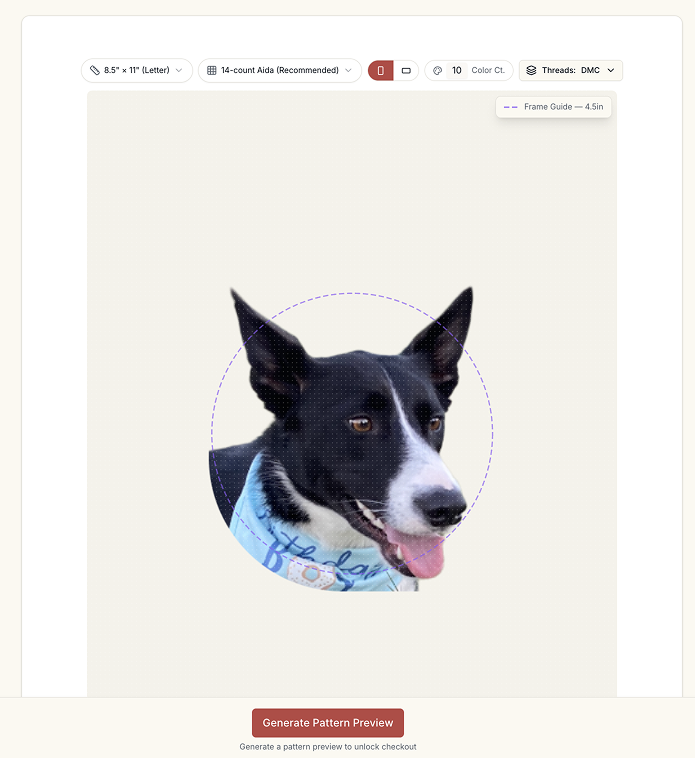
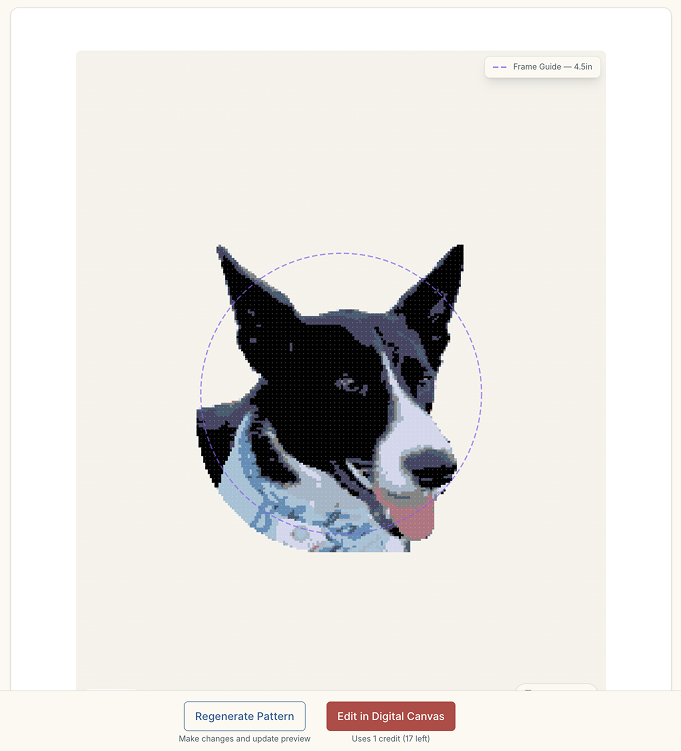
The converter groups similar pixels, maps them to DMC or Anchor, and runs confetti reduction so you are not constantly parking the needle for a single isolated cross of a near-identical shade. Confetti is the classic failure mode of photo cross stitch: it looks busy on the chart and disappears at viewing distance.
When you look at the preview, check:
- Does the subject read at arm’s length?
- Are skin or fur modelled with a handful of related shades, or a spray of leftovers?
- Would 10–15 colours (bold) or 20–30 (most portraits) fit this photo better than 40+?
10–15 colours suits high-contrast or stylised looks. 20–30 is the usual portrait and pet range. 40+ only pays off on a large, fine grid.
3. Work on the digital canvas
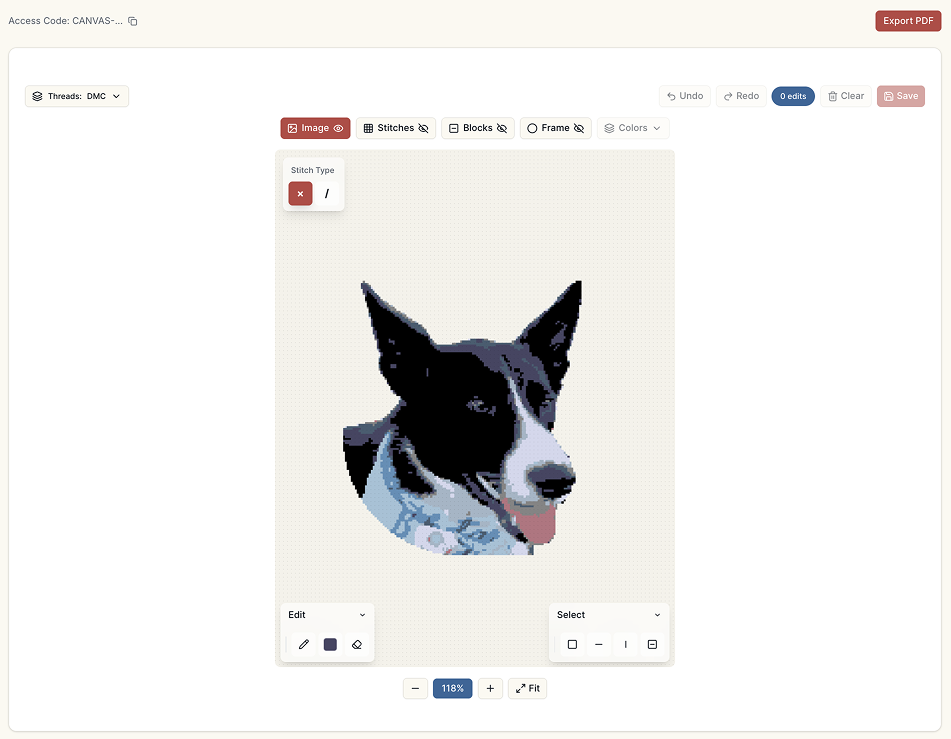
The digital canvas is where you correct what quantization cannot know: a stray colour on a cheek, a muddy mix in an eye, a background blotch. You can edit stitches, swap a floss everywhere, view colour layers, zoom, and read a bill of materials with colour numbers and lengths. Export a printable chart and key when the piece is stitchable.
Useful for cross stitch in particular:
- Cleaning single-stitch confetti the algorithm left
- Keeping a pale Aida showing as sky or negative space
- Checking that dark outlines still exist if you planned optional backstitch later (the chart itself is still counted full crosses)
Cross stitch notes that change the chart
- Aida count changes finished size and how hard the holes are to see, not the number of stitches in the file. Same 140-wide pattern: ~10" on 14-count, ~7.8" on 18-count.
- Two strands on 14-count is the usual coverage; 18-count often uses one or two depending on how much Aida you want to hide.
- Hoop or Q-snap: plan extra fabric; the stitch grid is only the design.
- Pet fur and dark eyes need a photo with catchlights and contrast — see pet portraits from photos.
Quick facts
- Counted full crosses on 11 / 14 / 16 / 18 Aida
- 2–50 DMC or Anchor colours; 20–30 for most photo portraits
- Confetti reduction exists because photo charts otherwise sprinkle singleton Xs
- Fabric can remain visible; that is a design choice, not a defect
Whether you searched for image to cross stitch, picture to cross stitch pattern, or cross stitch from photo, the steps above are the same. The preview is free, so try it with your own image before deciding on colours and count.
Related: needlepoint, tapestry, canvaswork.
Try it with your own photo
Upload a photo and see your counted cross stitch pattern preview — free, before you pay anything.
Try the free pattern preview